
Four ways to keep a 3D printer running without you
There are only a handful of ways to stop a 3D printer from waiting for a human, and they solve different problems. Choosing between them is easier once you stop asking which is best and start asking which bottleneck you actually have.
A note on what this page compares. It compares four approaches, not four products. We sell one of them, which makes us a poor judge of anyone else’s specifications, and several companies working in this field are partners of ours. Rather than publish figures about other people’s hardware that we cannot verify or keep current, this page describes how each approach works and what it is structurally good and bad at. The shortlist is yours to make.
1. Automatic plate changing
The printer ejects the finished build plate, pulls a blank one in from a magazine and carries on with the next job. The machine works through a queue instead of stopping after every plate.
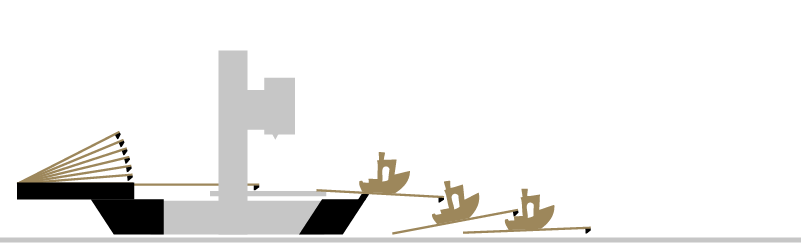
Suits: repeat runs of the same or different parts; placing multiple parts on the entire plate is possible; multicolor parts which produces less waste when printed in batches can fill the entire buildplate; multi-colour assembly avoids the entire purge waste when printing one colour per plate; spreading risk so one failure costs one plate rather than a whole bed; saves energy, as heatbed don’t need to cool down after each print; and above all overnight and weekend running on a printer you already own.
Stops at: a single long print, which gains nothing; different nozzles diameter for each job will not work; needs certain space to operate; and harvesting from ejected plates, which stays manual; module currently not available for enclosed printers
Cost shape: The automation module, plus one build plate for every job you want to be printed without you being there.
2. A second printer
Instead of making one machine wait less, you add another machine so that waiting matters less. It is the most common answer and, for a large number of people, the right one.

Suits: genuinely different jobs running in parallel; different materials or nozzle sizes at the same time; and redundancy, because a breakdown or a maintenance day now costs you half your capacity instead of all of it. Furthermore you can choose any printer model you need (included enclosed printers) or pick a different (larger) size for the second printer.
Stops at: the problem it does not touch. A second printer does not reduce the number of times somebody has to walk over and restart something. It doubles it. Labour per finished part is unchanged; you have simply bought more of it.
Cost shape: a complete machine, plus the space, power and maintenance that comes with it.
The honest summary: if you want to print multiple parts simultaniously , buy a second printer. If your problem is being interrupted, a second printer makes it worse.
3. Belt printers
The bed is a moving belt, usually angled. Finished parts are carried off the end while the next one is already printing, so the machine never stops for a plate at all. It is the only genuinely continuous approach on this page.
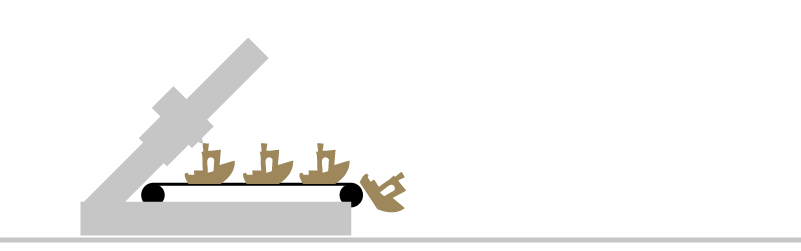
Suits: very long runs of one part, and parts longer than the machine itself, which nothing else here can do.
Stops at: geometry. The angled first layer changes how parts have to be designed and oriented, surface finish differs from a flat bed, and slicing for a belt is a separate skill rather than a setting. It also means buying a specialised machine instead of improving one you own.
Cost shape: a dedicated machine, plus a learning curve that is genuinely steep.
4. Part ejection systems
Rather than moving the plate, the part is pushed, scraped or swept off it. The plate never leaves the printer, so there is no magazine and no plate cost.
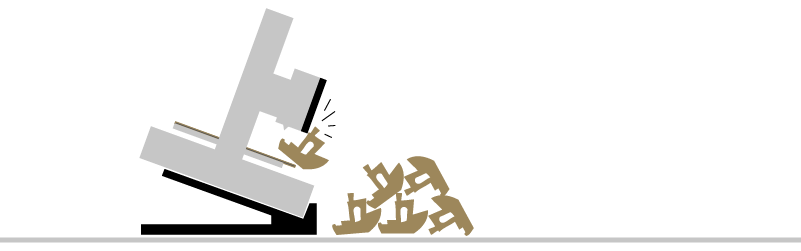
Suits: high volumes of one small, flat, well-behaved part. When it fits, it is the cheapest and fastest cycle of the four.
Stops at: almost everything else. Adhesion is the entire problem: a part has to stick well enough to print and release easily enough to be pushed off, and those two requirements pull against each other. Tall parts topple, delicate parts break, large footprints refuse to move. Ejected parts also land in a pile, which is fine for a bracket and unacceptable for a finished surface. You’ve got to test each new material and printed part, and adjust and fine-tune the ejecting gcode each time you change the filament supplier or part geometry.
Cost shape: the lowest of the four, and the narrowest fit.
Which one answers your problem?
| Approach | What it removes | Suits | Where it stops | Cost shape |
|---|---|---|---|---|
| Plate changing | The restart between jobs | Repeat runs; overnight and weekend running; more output from a printer you own | One long print; automatic harvesting; additional space | Module, plus plates |
| A second printer | Nothing — it adds capacity, not autonomy | Parallel jobs, different materials, redundancy | Any problem caused by interruptions | A whole machine, plus space and power |
| Belt printing | The stop, entirely | Very long runs of one part; parts longer than the machine | Varied geometry; surface finish; slicing habits | A dedicated machine, plus a new skill |
| Part ejection | The plate handling | High volumes of small, robust parts with suitable design | Tall, delicate or large-footprint parts | Lowest, and the narrowest fit |
Where each of these stops making sense
- Plate changing stops making sense when you often switch nozzle diameters or you need an enclosed printer.
- A second printer stops making sense the moment the person, rather than the machine, is the bottleneck.
- Belt printing stops making sense as soon as your catalogue is varied, because every new part is a new design problem.
- Part ejection stops making sense the first time you print something tall or brittle.
And one limitation they share: none of them does the job most people would actually like automated, which is removing parts from plates and sorting them. That remains manual in every approach on this page.
In practice, these combine
These four are not rivals so much as answers to different questions. Plate changing removes interruptions; a second printer adds capacity. A workshop that needs both usually ends up buying both — and normally in that order, because the cheaper of the two fixes the more expensive problem first. A printer that no longer waits is worth more than a second printer that also waits.